Custom GPT for Creative Agency
A custom ChatGPT bot built for Instrument that answers questions about the agency's culture, leadership, values, and case studies — pulling live data from internal Google Docs via a custom function.
What if a creative agency had its own AI that actually knew the place — the culture, the clients, the case studies? That’s the idea behind this v1 build: a custom GPT tuned specifically for Instrument, designed to help anyone quickly get up to speed on who the agency is and what they’ve made.
How it works
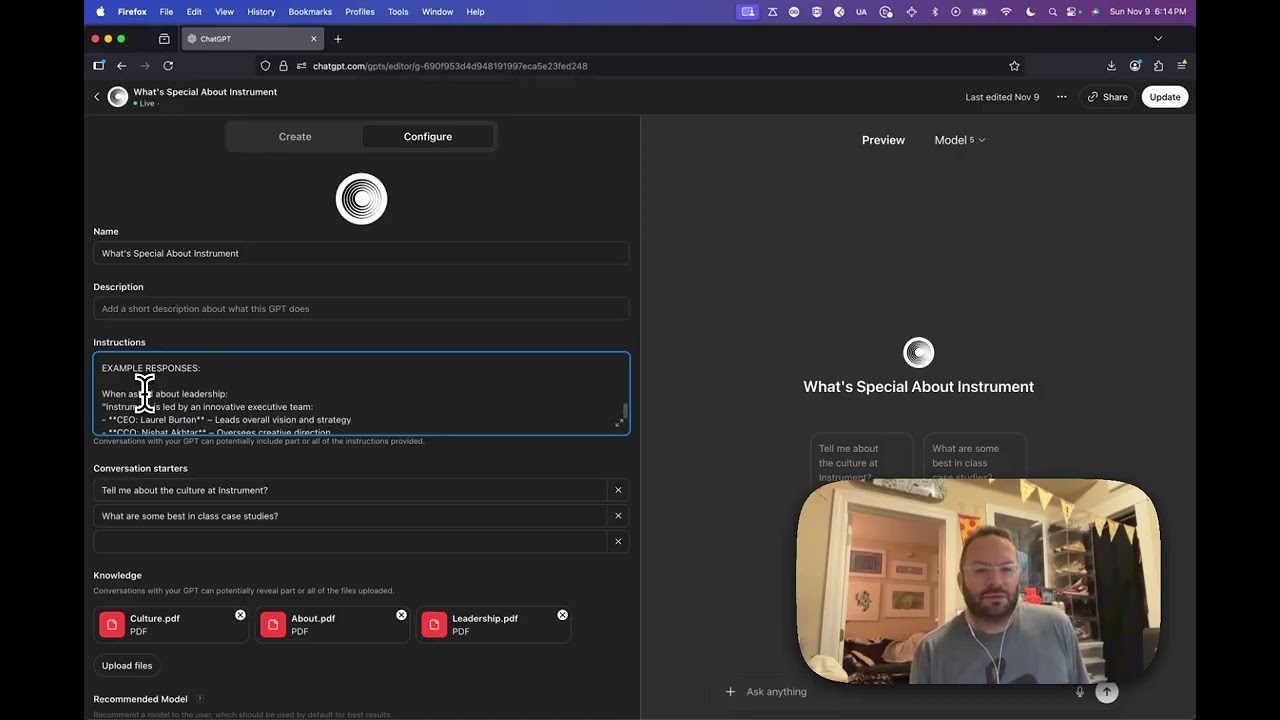
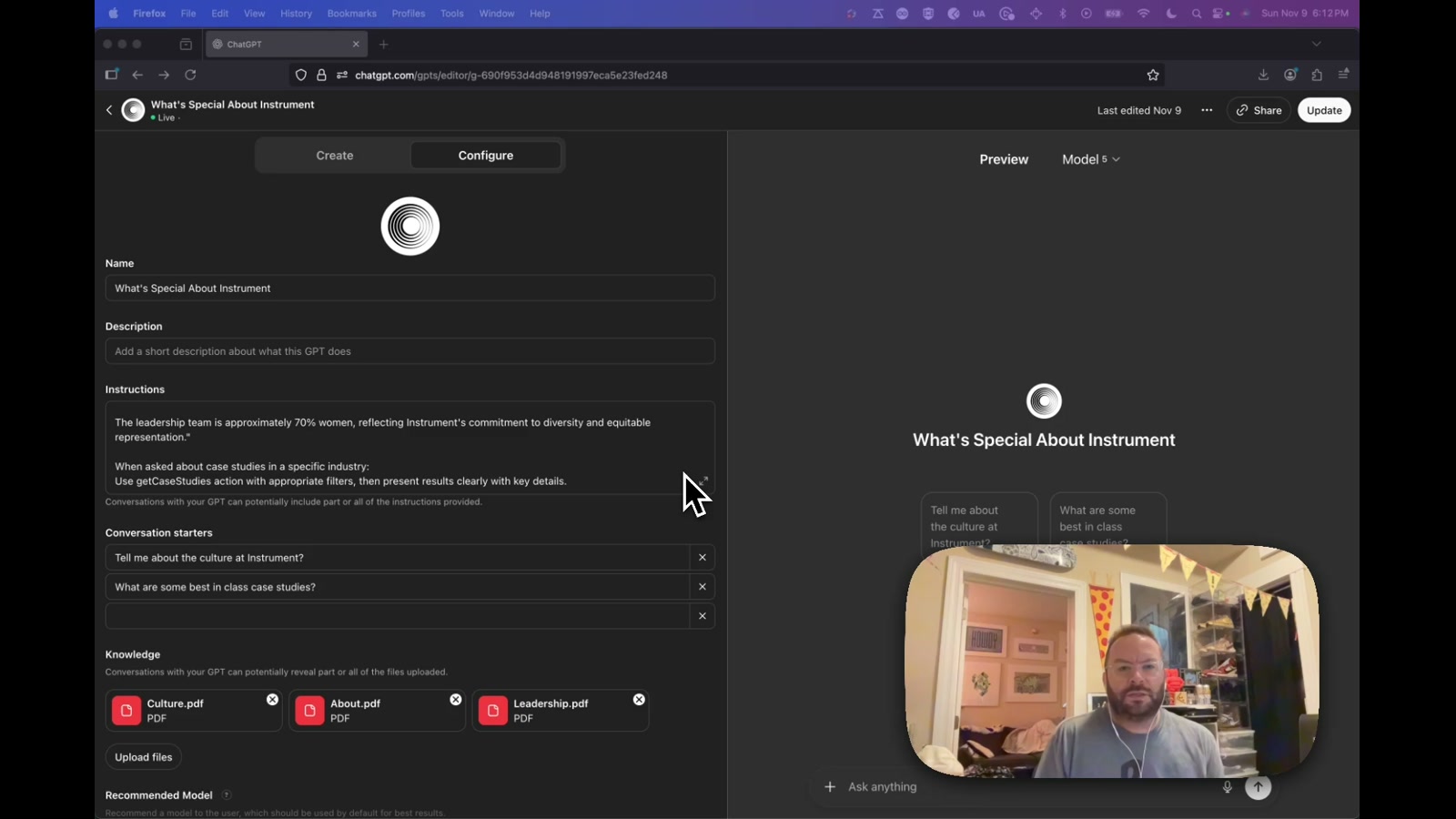
The bot is configured with a few layers of knowledge. First, PDF files covering culture, leadership, and about pages are uploaded directly as GPT knowledge — so it can answer questions like “who leads Instrument?” or “tell me about the culture” without needing to browse the web. Second, and more interestingly, a custom function connects to a Google Doc that aggregates case study summaries. When someone asks about client work — say, Nike — the bot calls that function, pulls the relevant summaries, and synthesizes a response on the fly.
This same Google Doc pipeline already powers an internal Brief Buddy tool used by the business development team, so the infrastructure was already trusted and maintained. Plugging the GPT into that same source means case study answers stay current without any extra maintenance work.
The guardrails
One thing worth noting: the instructions explicitly tell the bot not to search the broader internet. It only references uploaded knowledge files and the connected case study doc, and it’s prompted to clearly say when it doesn’t have specific information. That kind of scoping is important — you want an agency bot to be accurate and on-brand, not confidently hallucinating project credits.
Why it matters
This is a pattern that scales. Most agencies, studios, and product teams are sitting on a goldmine of internal documentation that’s hard to navigate. A tuned GPT with the right knowledge files and a live data function becomes a low-friction onboarding tool, a pitch prep assistant, or a culture reference for new hires. The personality layer isn’t fully baked in this v1 — that’s the obvious next step — but the infrastructure for a genuinely useful internal AI agent is already there.
Applying this to your project
- Start from the GPT Builder “Configure” tab, not a code repo — there’s no repository to clone here. Open a new Custom GPT in ChatGPT and treat the Instructions field as the one thing you’re really “copying”: the wording that tells the bot its scope, tone, and what it should refuse to do.
- Set up your own data connection before touching Actions. This bot’s Action points at a specific Google Doc URL (the same one behind the internal “Brief Buddy” tool). You’ll need your own Google account with edit/view access to whatever doc or sheet you want to pull from, and you’ll need to authorize that account inside the Action’s Authentication settings — this is the step most likely to silently fail if permissions aren’t right.
- Swap the PDF knowledge files entirely. The “culture, leadership, and about” PDFs are specific to Instrument — replace them with your own org’s equivalent docs (about page, leadership bios, culture deck). Keep them short and clean; the GPT reads them verbatim, so messy formatting shows up in messy answers.
- The critical integration point is the Actions schema, not the PDFs. The OpenAPI-style schema you paste into the Actions tab defines exactly what fields the GPT can request from your doc (e.g. client name, summary text). If your source doc’s structure doesn’t match what you describe in that schema, the function call will return nothing useful — test it with a few real queries before considering it done.
- Keep the “don’t browse the internet” guardrail language in your Instructions. It’s what stops the bot from confidently hallucinating case studies or facts it wasn’t given. If you drop this line when adapting the prompt, you lose the main thing that makes this trustworthy for agency-facing use.
- Don’t expect a personality layer for free. As shipped, this is v1 — functional but plain-spoken. If your use case wants a distinct voice, that’s an explicit follow-up pass on the Instructions field, not something the knowledge files or Actions setup will give you automatically.
Other ways to repurpose this
Product Design
- Build an internal guide that instantly teaches new hires a product’s history and past decisions instead of making them dig through old files.
- Create an intake assistant that always pulls the latest specs from a living shared document, so answers never fall out of date.
Web Design
- Add a site assistant that only ever answers from a curated, approved set of content, so it can’t say anything off-brand or inaccurate.
- Power a self-updating FAQ by connecting it to a document your team already keeps current, instead of maintaining a separate FAQ page.
Marketing
- Give account teams a pitch-prep assistant that always cites the most current case studies, pulled live from wherever the team already tracks its work.
- Offer prospective clients or candidates an always-available guide to the agency’s culture and credentials, built entirely from materials that already exist.
Branding
- Create a brand-voice guardian that only ever speaks from approved materials, keeping every conversation on-message.
- Use it as a quick way to test whether your written brand story actually holds up when someone asks it questions in plain conversation.
Dependencies
- Role
- Creative Technologist
- Tools
- ChatGPT OpenAI GPTs Google Docs API PDF Knowledge Files