Brand Gut Checker: AI-Powered Design Review in Figma
A Figma plugin that evaluates designs against brand guidelines using multiple LLM vision models, revealing how differently AI interprets visual content
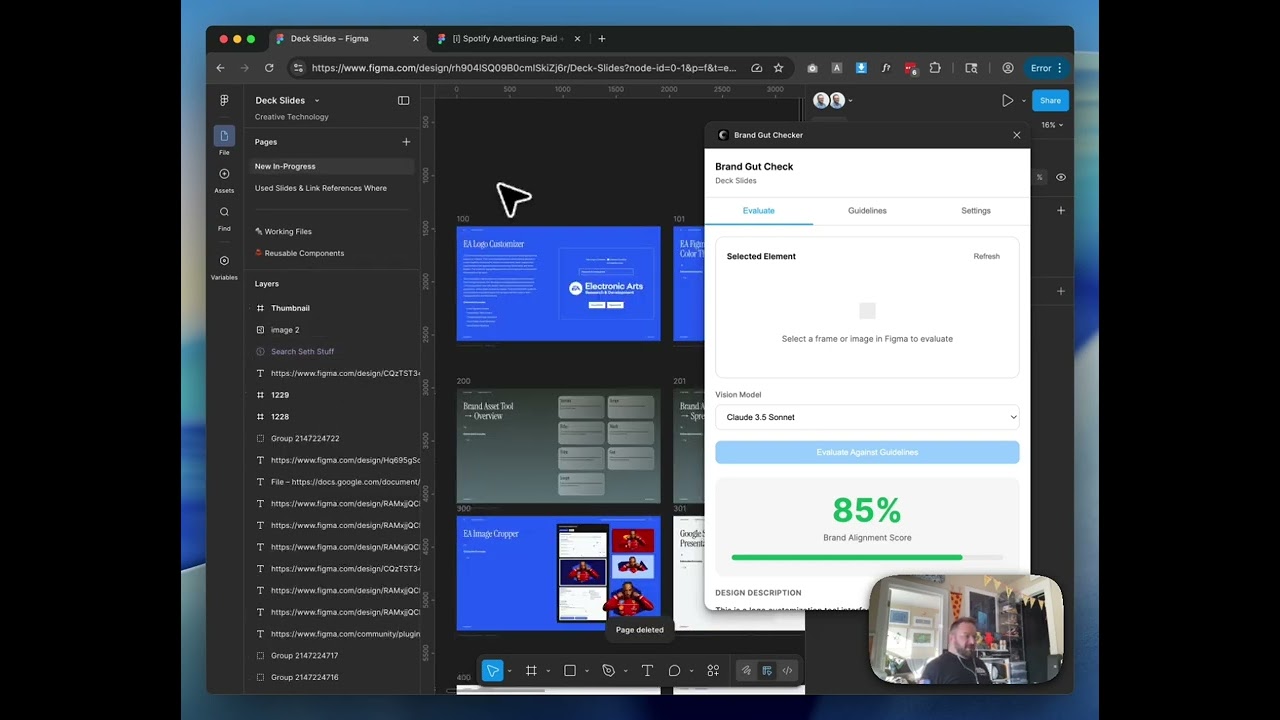
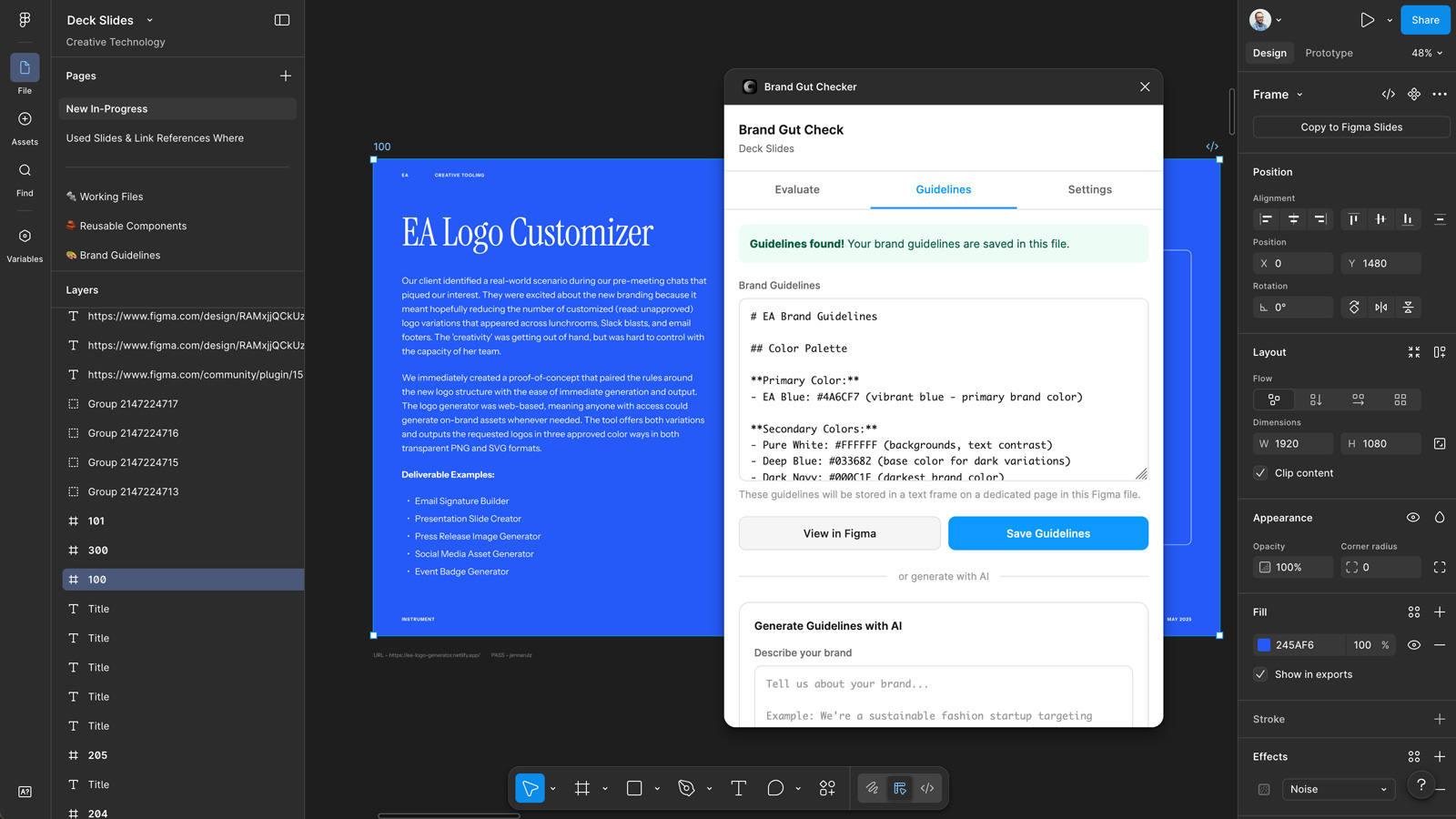
This started as a simple idea: what if you could get a quick gut check on whether a design feels on-brand without pulling someone into a review meeting? I built a Figma plugin that lets you select any frame, pick an LLM vision model (Claude, GPT-4, and others via OpenRouter), and get a scored evaluation against your stored brand guidelines. It breaks things down across dimensions — color usage, typography, layout, photography, mood — and gives you explanations for each score. You can also use the plugin to extract guidelines from existing frames or generate them from a text description, and everything gets stored in a dedicated Figma page so the whole team has access.
The fascinating discovery
Here’s what I didn’t expect: different models give wildly different scores for the exact same frame. One model scored a design at 25%, another gave it 85%. Same frame, same guidelines, completely different interpretations. That was a genuine “huh” moment. It reveals something important about how these vision models process visual information — they’re not just reading pixels, they’re interpreting intent and context, and they each have very different biases about what constitutes “good” adherence to a guideline. It’s a reminder that AI evaluation is still a complement to human judgment, not a replacement for it.
How it works under the hood
The plugin captures the selected frame as an image, sends it along with the stored guidelines to whichever model you’ve picked through the OpenRouter API, and parses the structured response back into the scoring UI. OpenRouter is the key piece here because it gives you multi-model access through a single API — so instead of managing separate API keys and integrations for every provider, you get one endpoint that can route to Claude, GPT-4, Gemini, and others. That’s what makes the model comparison possible without the plugin becoming an engineering nightmare to maintain.
Applying this to your project
-
Clone the core plugin files, discard the rest. You need
manifest.json,code.ts(compiles tocode.js),ui.html,tsconfig.json, andpackage.json. Skipnode_modulesandpackage-lock.json— just runnpm installfresh. Inmanifest.json, drop the existingidfield; Figma assigns a new plugin ID automatically when you import the manifest into the Figma desktop app. -
Set up your own OpenRouter key. Create an account and key at openrouter.ai/keys. Do NOT hardcode it like this project currently does (see the flag above) — instead, delete the
const OPENROUTER_API_KEY = '...'line inui.htmland use the API-key flow that’s already built: theget-api-key/save-api-key/clear-api-keymessage handlers incode.tsstore the key viafigma.clientStorage, and the Settings tab already has the UI hooks for it (you’d just need to re-add an input field there, since the current UI assumes the key is baked in). -
Swap out the branding. Change the header text (“Brand Gut Check”) and tab labels in
ui.html, theGUIDELINES_PAGE_NAMEandGUIDELINES_FRAME_NAMEconstants incode.ts(these control what page/frame name gets created inside a user’s Figma file), thenamefield inmanifest.json, and the model options in the<select id="model-select">dropdown if you want different vision models available. -
Know where your content plugs in. The brand guidelines text is entered in the Guidelines tab textarea (
id="guidelines-textarea") and gets saved as a plain text frame on a dedicated Figma page viacreateGuidelinesFrameincode.ts— that’s the one persistent piece of user data. The actual evaluation logic lives entirely in the prompt strings insiderunEvaluation(),generateGuidelines(), andrunGuidelinesExtraction()inui.html— to repurpose this for a different kind of review (not “brand alignment”), rewrite those three prompt templates. -
Non-obvious gotchas:
manifest.json’snetworkAccess.allowedDomainsonly permitshttps://openrouter.ai— any other API domain you add will get silently blocked by Figma unless you add it there too.exportSelectionAsImage(used for evaluation) only exports the first selected node (selection[0]), even with multiple items selected — but the extraction flow supports up to 4 (selection.slice(0, 4)). That asymmetry is easy to miss if you’re extending either path.- Font loading only calls
figma.loadFontAsyncfor “Inter” Regular/Bold. If guideline text needs other styles, you’ll hit a runtime error unless you load those fonts too. - The score display relies on the LLM response containing a literal
Score: NUMBERstring, matched by the regex/Score:\s*(\d+)/iindisplayResults(). If you edit the prompt’s expected output format, update this regex too or the score bar will silently stop rendering.
Other ways to repurpose this
Product Design
- Let a product team write down their design principles once, then get instant feedback on whether a new screen actually follows them, instead of waiting for a formal design review.
- Use the same “compare against real examples” idea to flag new UI patterns that drift from an established pattern library.
Web Design
- Give clients a quick way to check whether new page mockups still match their existing site’s look and feel before anything goes live.
- Let a small business owner describe their vibe in a couple sentences and get a starter style guide back, without hiring a designer just to get that first draft.
Marketing
- Score marketing creative — ads, social graphics, email banners — for on-brand consistency before it ships, catching drift while it’s still cheap to fix.
- Turn a folder of past successful campaign visuals into a written playbook of what “on brand” actually looks like, so new hires and freelancers ramp up faster.
Branding
- Build a brand’s style guide automatically by pointing the tool at a handful of existing materials, instead of writing one from a blank page.
- Give a brand a living rulebook that lives inside the actual design files, so it travels with the project instead of getting buried in a PDF nobody reopens.
Dependencies
- Role
- Creative Technologist
- Tools
- Figma Plugin API OpenRouter Claude GPT-4 Vision Brand Guidelines
- Metrics
- Multi-model scoring across color, typography, layout, photography, and mood