Figma Plugin for Campaign Briefs
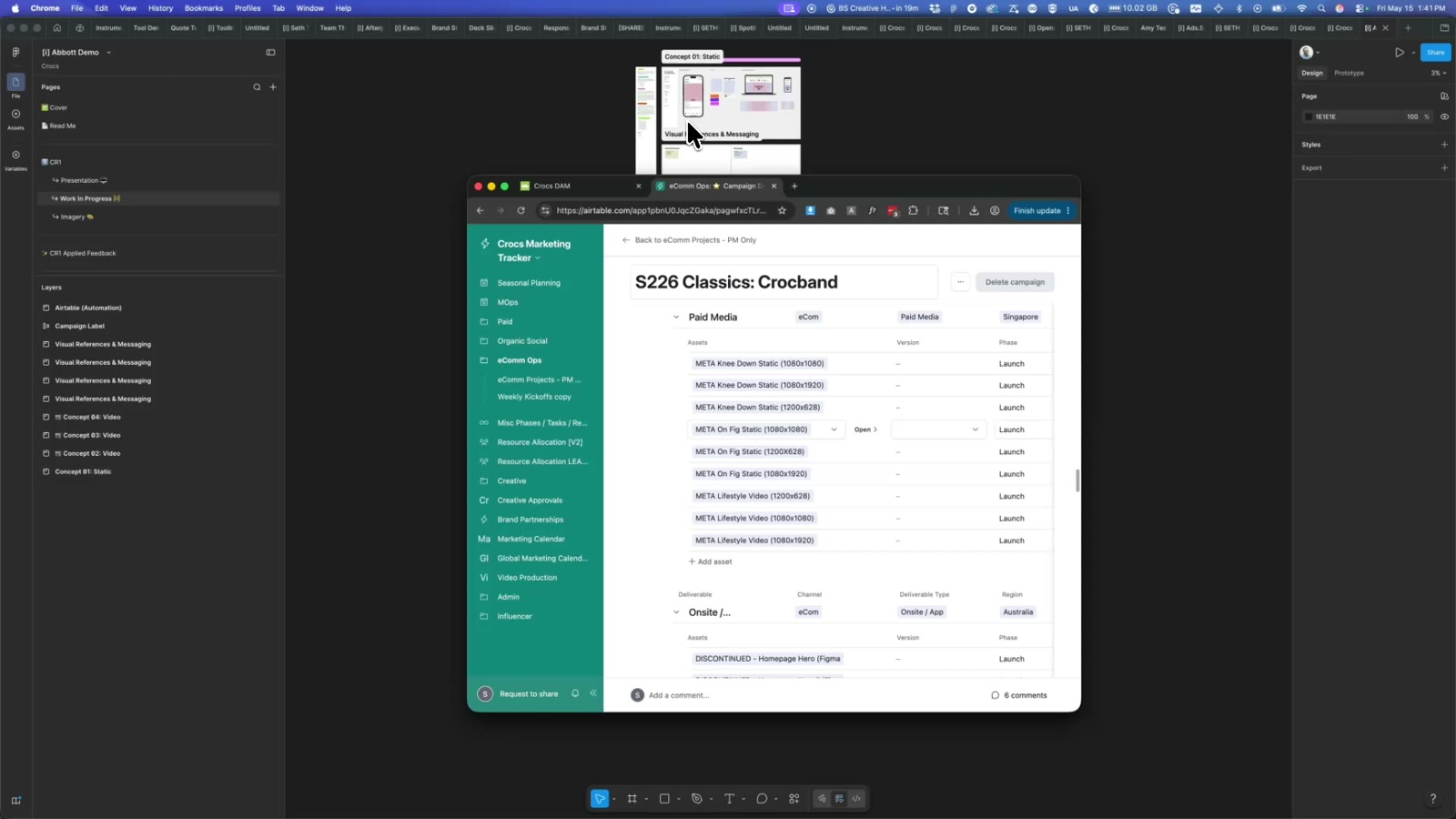
A custom Figma plugin that pulls live campaign data from Airtable and auto-populates creative brief templates — cutting manual copy-paste work across dozens of deliverables. Built for the Crocs global marketing team, it syncs campaigns, deliverables, assets, regions, and Bynder image references directly into Figma in one click.
Building creative briefs at scale is tedious — campaign name here, region there, asset filenames copy-pasted from a spreadsheet, then repeat for every deliverable. For the Crocs global marketing team, that meant dozens of manual updates per campaign across Paid Media, CRM, eComm, Display, and more. This plugin eliminates that entirely.
How it works
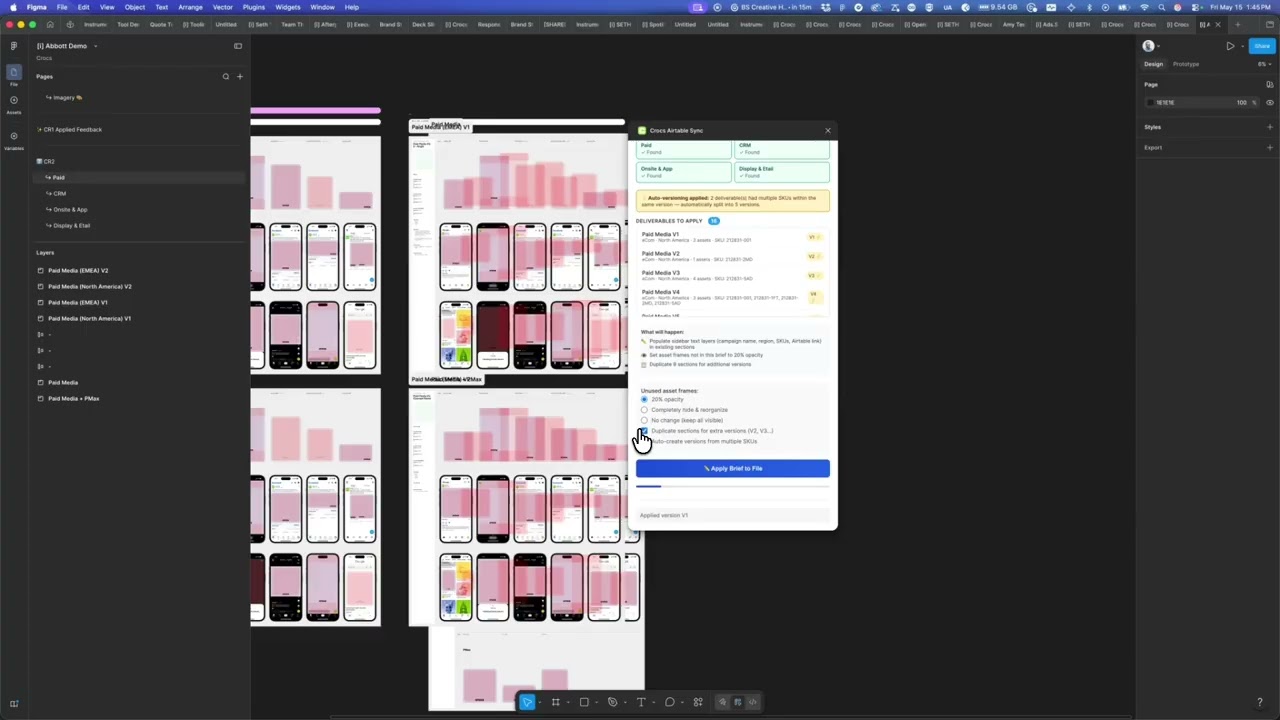
The plugin connects Figma directly to Crocs’ Airtable base, pulling the full campaign data graph — campaigns, deliverables, assets, channels, and regions — and maps it into a Figma brief template. Select a campaign, hit Generate All Assets, and the plugin walks every page, finds the matching section frames by keyword, and populates text layers like PLUGIN_CampaignName, PLUGIN_Region, and PLUGIN_SKUs with live data. Frames whose dimensions don’t match the brief spec are dimmed to 20% opacity automatically, so reviewers can see at a glance what’s missing or mismatched.
The Bynder integration
Version 4 added a visual image picker using Bynder’s Compact View — no API credentials required, just your existing Bynder session. Click “Link Images from Bynder,” search and multi-select the campaign assets, and the plugin matches them to Airtable’s Visual Reference field using a smart three-tier matching algorithm: exact match, partial match, then extension-stripped match. A preview panel shows how many images are linked before you generate, so there are no surprises.
The build
Under the hood, the plugin is TypeScript compiled to Figma’s plugin runtime, with a full HTML/JS UI panel that handles the Airtable and Bynder network calls. A suite of browser-console debug scripts — campaign inspectors, deep record explorers, Display & Etail discovery tools — made it possible to map Airtable’s relational structure accurately before writing a single line of plugin code. Version logic even handles V1/V2 deliverable splits, duplicating and placing sections automatically.
Why it matters
This pattern — Figma as a live output layer for structured ops data — is broadly applicable. Any team managing templated creative at scale (retail, publishing, brand licensing, events) could replace manual brief-filling with a plugin like this. The Bynder Compact View approach is particularly reusable: it means any DAM-integrated team can add visual asset picking to their Figma workflow without building a custom OAuth flow.
Applying this to your project
- Clone
code.ts,manifest.json,ui.html, andtsconfig.json; discardscripts/and theairtable-*-explorer.jsfiles — those are one-off data-exploration scripts the author used to inspect the Airtable schema and aren’t part of the running plugin. - Set up your own Airtable base and token. Replace the hardcoded
API_KEYandBASE_IDvalues inside theCONFIGobject near the top ofui.html(around line 357) with your own Airtable personal access token and base ID. Don’t commit a real token to a public repo — this project currently has one hardcoded, which is a mistake worth avoiding in a fork. - Update
manifest.json’snetworkAccess.allowedDomainslist to match your own services — swapapi.airtable.comfor whatever data source you use, and replace the*.bynder.com/ CloudFront entries with your own DAM or image host domains. Figma blocks any network request to a domain not explicitly listed here. - Rework the field-name mapping, not the logic. The plugin’s matching logic (in
code.tsand documented inPROJECT_CONTEXT.md) is keyed entirely off hardcoded Airtable field names (Project Name,Overview,Deliverable Name, etc.) and Figma layer names (PLUGIN_CampaignName,Overview,SKU List). To adapt this for a different content source, you mainly need to change these string constants to match your own spreadsheet/database’s column names and your own Figma template’s layer names — the fetch/match/write logic itself can stay as-is. - Your content plugs in at two points: the Airtable
fetch()calls inui.html(which pull the actual campaign/asset data) and the layer-name lookups incode.ts(which decide where that data gets written inside the Figma frame). Both sides have to agree on names — if you rename a Figma layer, you must also rename the corresponding lookup string incode.ts. - Gotcha: page/section detection is done by parsing text, not IDs. The plugin finds Figma pages by case-insensitive substring match on page names (e.g. anything containing “paid” or “crm”), and finds asset dimensions by regex-parsing frame names for a
WxHpattern (like_1080x1920). If your own Figma template doesn’t follow a similar naming convention, you’ll need to either rename your frames to match or rewrite the parsing functions incode.ts. - Gotcha: Bynder’s image picker only works reliably in Figma Desktop, not Figma’s web client — worth flagging in your own docs if you reuse this pattern, since it’s an easy thing for a client to trip over.
- Run
npm installthennpm run build(ornpm run watchduring development) to compilecode.tsintocode.jsbefore importing the plugin manifest into Figma.
Other ways to repurpose this
Product Design
- Build a companion tool that automatically fills out a working prototype using real product data instead of lorem-ipsum placeholders, so reviewers evaluate designs with content that actually looks and reads correctly.
- Let a design tool pull in live inventory or catalog information so mockups never go stale between the moment they’re built and the moment they’re presented.
Web Design
- Create a bridge between a client’s existing spreadsheet or content system and their design files, so updating a page’s copy or images is as simple as editing a row.
- Automatically flag design elements that don’t match the required sizes or specs for a given placement, so nothing ships in the wrong dimensions.
Marketing
- Give a marketing team a way to generate all the versions of a campaign asset across regions and channels from one shared brief, instead of manually rebuilding each one.
- Let campaign data live in one shared source of truth that both the marketing team and the design files can read from, so briefs and creative never drift out of sync.
Branding
- Offer a lightweight way for brand teams to preview how their approved imagery will look inside a locked-down template before anything is finalized, without needing design software access.
- Use naming conventions and structured templates to enforce brand consistency automatically, catching mismatched sizes or missing assets before a design ever reaches review.
Dependencies
- Role
- Design Engineer
- Tools
- Figma Plugin API Airtable API Bynder Compact View TypeScript JavaScript HTML
- Metrics
- Handles campaigns with dozens of deliverables across multiple regions and channels in a single generation pass.