EA Cropping Tool
A web-based image tool that automatically removes backgrounds, places game IP characters inside brand shapes, and exports production-ready assets with a breakout effect
Working with game IP images at a company like EA means constantly cutting characters out of backgrounds, fitting them into layouts, and making sure they look right across a dozen different contexts. It’s tedious work that falls on designers, and it’s the kind of thing that creates a queue. So we built a tool to take that queue down to zero.
How it works
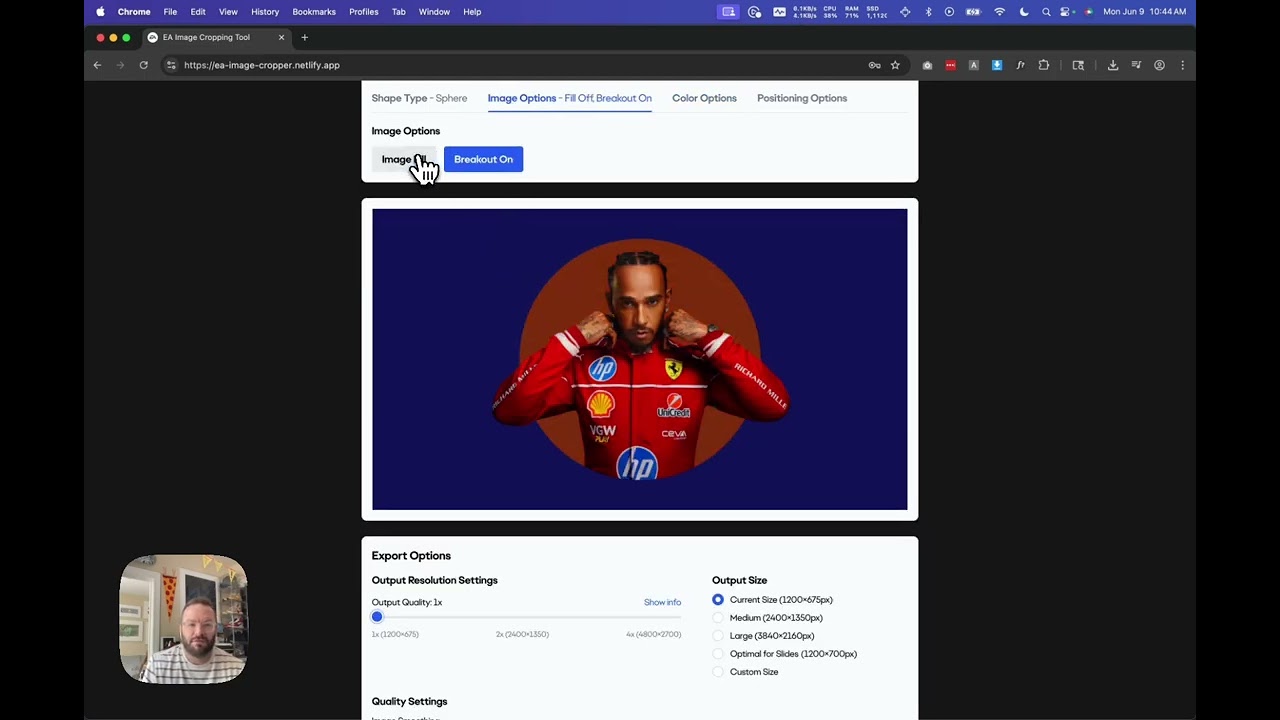
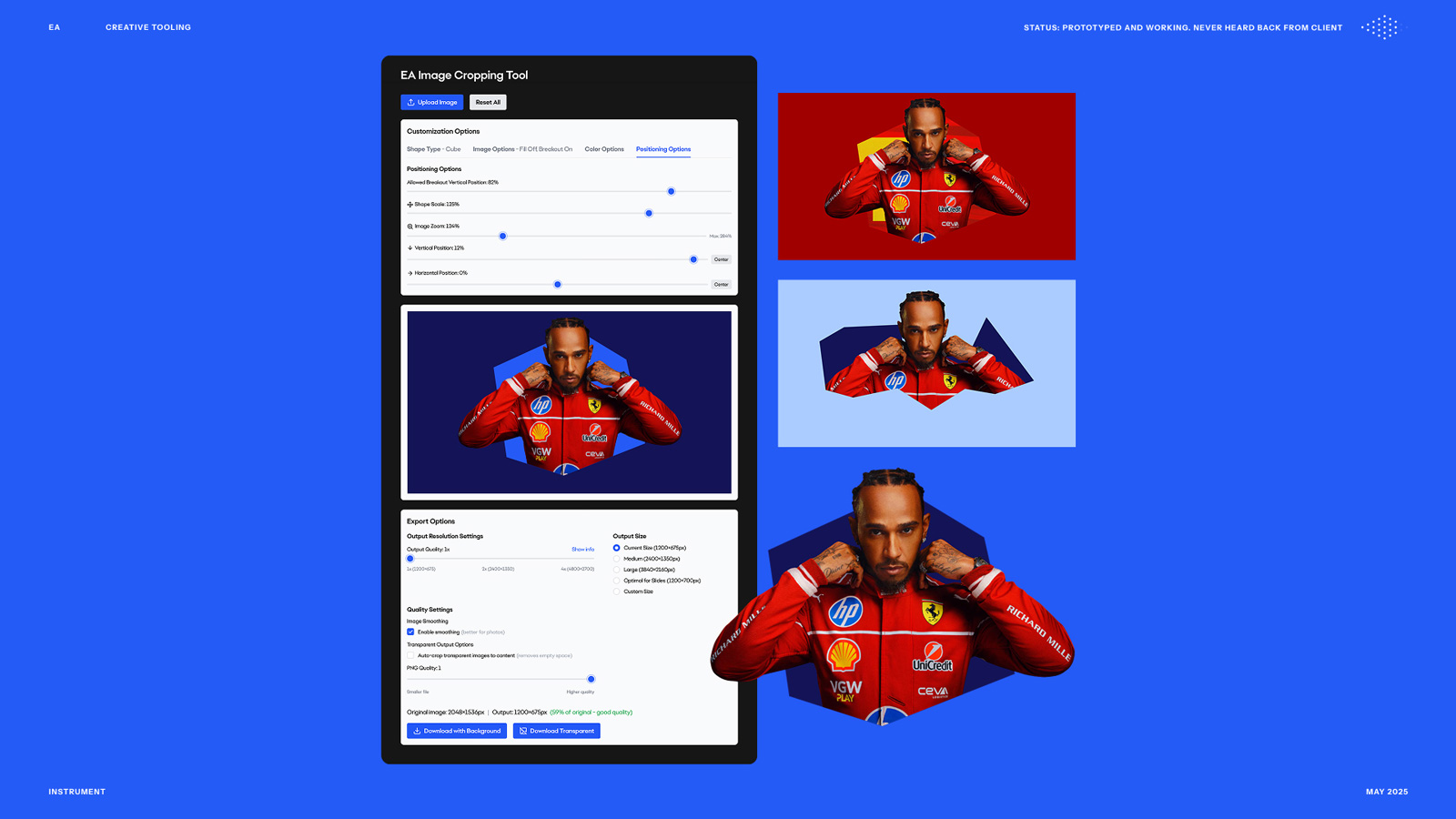
You drag in a full IP image — a game character, a creature, whatever — and the tool automatically removes the background using an AI-powered background removal API. From there, you can place the subject inside one of several brand shapes: sphere, cube, pyramid, or the EA trio. The real design challenge was what we called the breakout effect: the ability to have the character extend beyond the edge of the shape, so their head or arms push past the boundary and create something that feels dynamic rather than just stamped inside a circle.
To make that work, the tool is built as three independent layers — a background image, the shape itself, and a foreground image — all sharing the same crop. You control a vertical breakout line that determines where the shape clips the image, so you can dial in exactly how much of the character spills out. Shape scale, zoom, and horizontal position are all adjustable too, because you genuinely can’t predict how a given character is going to interact with a given shape until you see it. The flexibility isn’t nice-to-have — it’s the whole point.
Color options let you set the shape fill and background independently, with preset brand colors, a custom hex input, or an eyedropper that pulls the top three dominant colors straight from the uploaded image. Export gives you full quality or transparent background, and a tight crop option that trims to the exact edges of the composition. The tool also shows you the scale relationship between your upload and the output dimensions, so you don’t accidentally export a blurry asset from a small source image.
Why it matters
This is the same philosophy as the logo customizer: make the correct thing the easiest thing. Instead of a designer spending twenty minutes in Photoshop for every asset request, anyone with access to the tool can go from raw IP image to a production-ready, on-brand export in under a minute. The brand rules are baked into the shape options and color presets — you can customize within the system, but you can’t easily go off it.
Applying this to your project
- Copy the whole
image-processor/folder and discardnode_modules,build, and.env/.env.development/.env.production(they’re gitignored on purpose — one of them has a live API key in it during development). Keep.env.exampleas your template. - Get a remove.bg API key at remove.bg’s API page and drop it into a new
.envfile asREACT_APP_REMOVE_BG_API_KEY=.... This only powers local development —ImageProcessor.jsexplicitly only reads this env var whenprocess.env.NODE_ENV === 'development'. In production there’s no build-time key at all; the app expects each visitor to paste their own key into the “API key manager” UI, which persists it tolocalStorageunder the keyremove_bg_api_key. If you want a single shared key for all users in production instead, you’d need to change that fallback logic. - Swap the branding: colors and fonts are centralized in
tailwind.config.js(theea-blue/deep-blue/dark-blue/sky-bluepalette and theeafont family) and the two.otffiles insrc/fonts/. Replace the font files, updatesrc/fonts.css, and change the palette intailwind.config.js— the rest of the UI already references these theme tokens rather than hardcoded hex values in most places (though thebackgroundOptionsandshapeFillOptionspreset swatches inImageProcessor.jsare hardcoded hex arrays you’ll want to edit too). - The critical integration point is the shape library in the
drawShapefunction insideImageProcessor.js— each brand shape (circle,rectangle,polygon,pyramid,group) is a hand-plotted canvas path with hardcoded coordinates. To adapt this for another brand’s shape language, you’d replace these coordinate arrays with your own logo/shape outlines (traced as canvas path points), and update the shape selector UI to match. - Non-obvious gotchas: (a) the “subject centering” logic in
findSubjectCenterassumes the background has already been stripped to transparent — it works by scanning alpha channel pixel density, so it only functions correctly on the remove.bg output, not on raw photos; (b) the app is hardcoded to only accept JPG/PNG (SUPPORTED_FORMATS) with a 12MB cap and a 10-megapixel PNG limit, both mirroring remove.bg’s own API limits, not arbitrary choices; (c)netlify.tomlpinsNODE_VERSION = "16"— bump this if your Netlify build fails on newer defaults; (d) there’s a large volume ofconsole.logdebug output left inImageProcessor.jsthat you’ll likely want to strip before shipping publicly.
Dependencies
- Role
- Creative Technologist
- Tools
- Background Removal API Canvas JavaScript Image Processing Brand Systems
- Metrics
- Drag-in to export-ready in under a minute, with full PNG and transparent output options