Downloading Original Images
A Figma plugin that extracts the original full-resolution images embedded in frames — with 1x and 2x export options, inline renaming, and bulk download or direct Drive delivery
When designers work in Figma, images get embedded into frames — cropped, masked, layered over. The original files aren’t always easy to get back out. For motion designers, production teams, or anyone downstream who needs the actual source image at full resolution, that means digging through assets, finding the original, and hoping it’s the right version. This plugin skips all of that.
How it works
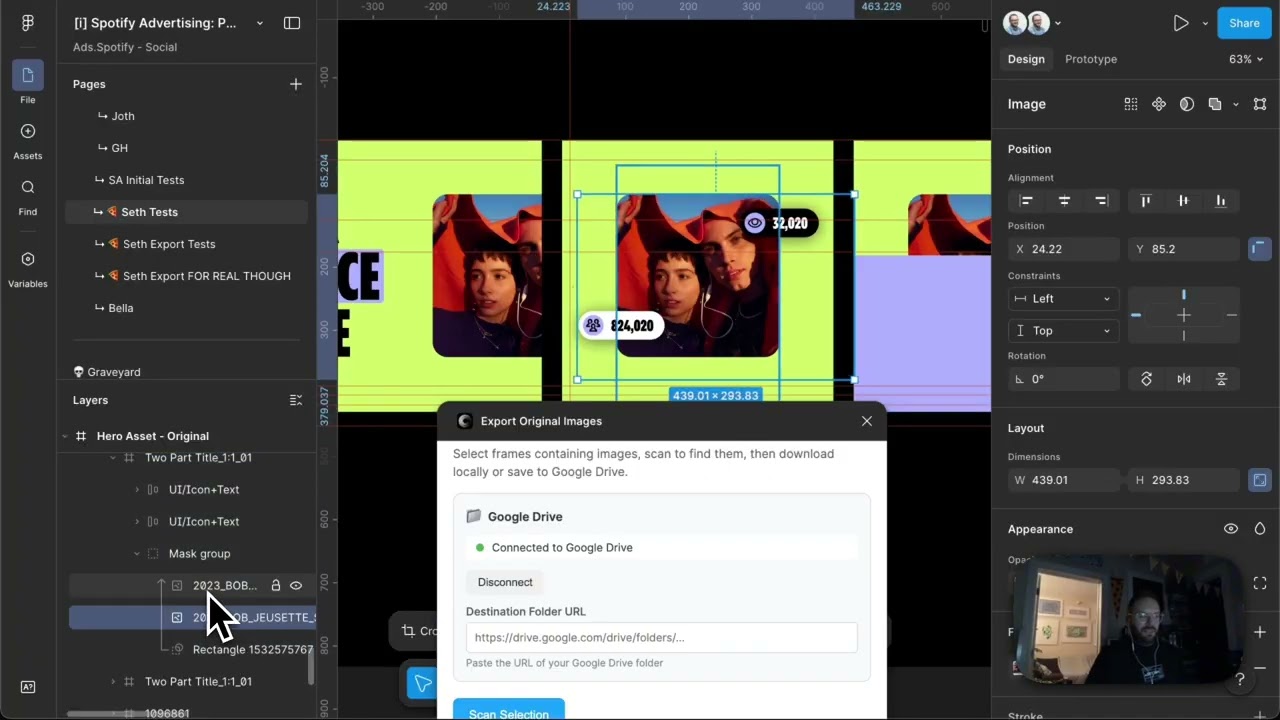
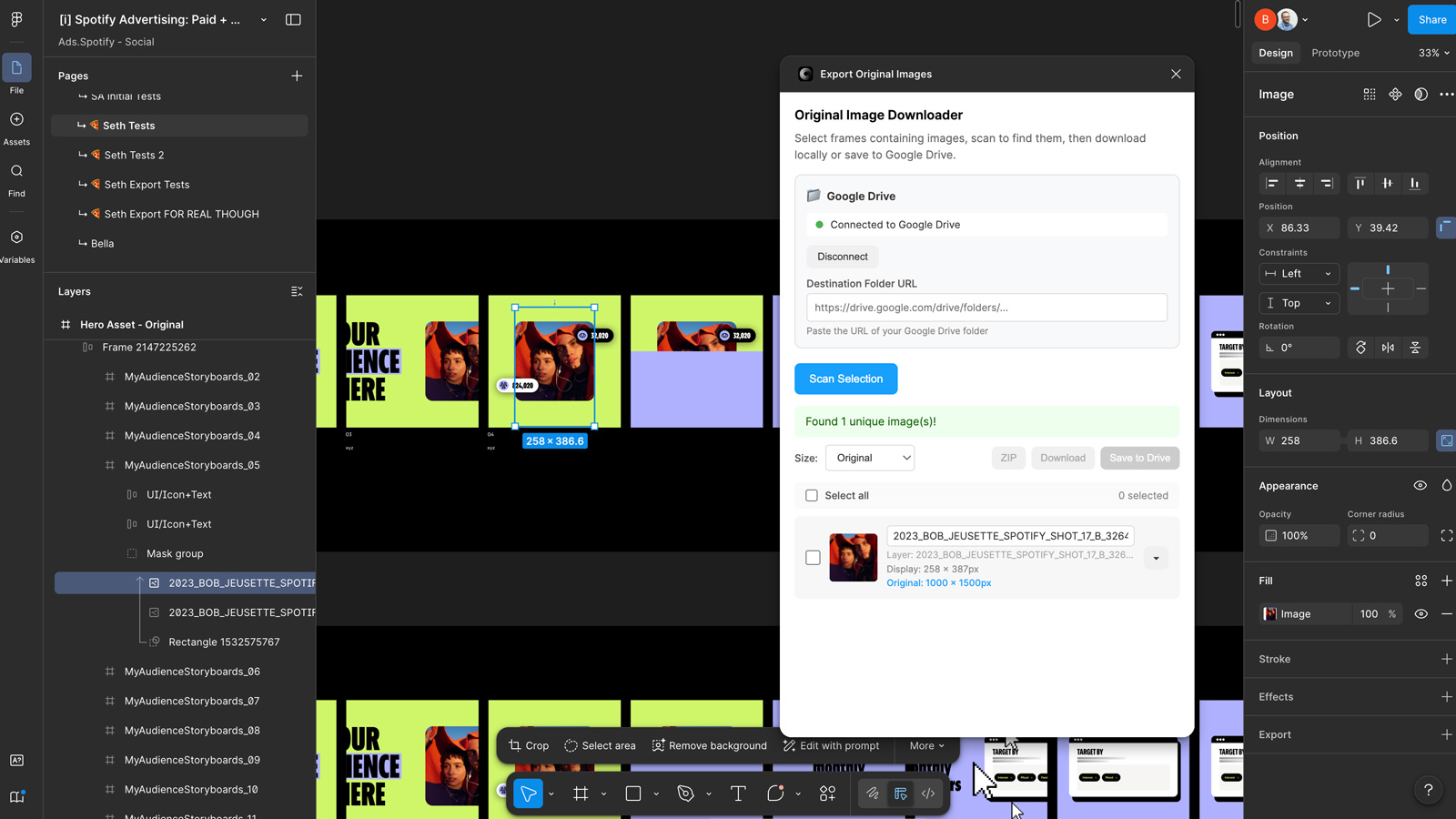
Select a frame or a set of frames, scan the selection, and the plugin surfaces every image it finds — including ones that aren’t immediately obvious. It handles the edge cases you run into in production work: a frame might have an image layer sitting on top of an image fill that’s technically still attached to the frame. The plugin detects both and exposes them separately, so nothing gets missed.
From there you have full control over what you do with them. Rename files inline before you export. Download at 1x (the original as-placed size) or 2x for retina. Grab individual files, select a subset, or export everything at once as a ZIP. You can also send directly to a Google Drive folder using the same Drive connection method as the other plugins in the suite — paste a folder URL and it goes straight there.
Why it exists
The ask came from motion designers who needed original images out of Figma files without quality loss or manual hunting. Figma’s native export gives you what the frame looks like — not necessarily the source image inside it. This plugin gives you the source. It doesn’t care how many layers are on top of it or how it’s been masked. It finds the image, gives you the options, and gets out of the way.
Applying this to your project
-
What to copy vs. discard. Copy
code.ts,code.js,ui.html,manifest.json,package.json, andtsconfig.json— that’s the whole plugin. DiscardREADME.mdas-is; it’s Figma’s generic plugin-scaffold boilerplate and doesn’t describe this project at all, so replace it with real instructions before sharing.PROJECT_CONTEXT.mdis internal dev documentation, not something Figma loads — keep it only if you want a similar living design doc for your own fork. -
API keys / environment setup. This repo itself has no
.envfile and stores no secrets — all Google OAuth logic (client ID/secret, token exchange) lives in a separate serverless backend hosted athttps://figma-to-drive.netlify.app(three functions:auth-start,token-refresh,drive-api). If you want the Google Drive upload feature, you must stand up your own equivalent backend (Netlify, Vercel, Cloudflare Workers, whatever) with your own Google Cloud OAuth client, then:- Update the
NETLIFY_URLconstant near the top of the<script>block inui.html(around line 605) to point at your backend. - Update
manifest.json’snetworkAccess.allowedDomainsto whitelist your backend’s domain (and dropfigma-to-drive.netlify.app/the Google OAuth domains if you’re not using Drive at all). - If you don’t want Google Drive integration, you can strip it entirely: remove the
.drive-sectionmarkup and related JS inui.html, and remove theget-tokens/save-tokens/clear-tokenshandlers incode.ts.
- Update the
-
What to swap to make it yours.
manifest.json: changenameto your plugin’s name, and generate a newid(don’t reuse this one — Figma assigns these uniquely; copying it can cause collisions).package.json: updatename,description.ui.html: swap the header text (“Select frames containing images, scan to find them…”) and any branding/copy in the status messages, plus theNETLIFY_URLconstant as above.- The JSZip CDN version pin (
3.10.1in the<script src>tag) — bump it if you want a newer release, and updatemanifest.json’s allowed domain list if you switch CDNs.
-
Critical integration points.
- All communication between the plugin backend and UI goes through one router:
figma.ui.onmessageincode.ts. New features are added as additionalif (msg.type === '...')blocks there, paired with a matchingparent.postMessage({ pluginMessage: { type: '...' } }, '*')call inui.html. This is where you’d plug in new data or new export types. findImageFills(node, images)incode.tsis the recursive walk that decides what counts as exportable content — right now it only matches nodes with anIMAGEfill. If you want to export something other than images (e.g. text content, component variants), this function is what you rewrite.- Byte data (thumbnails, original image bytes, scaled exports) is always transferred as base64 strings, never raw arrays — see
uint8ArrayToBase64()incode.tsandbase64ToUint8Array()inui.html. Any new byte-transferring feature must follow this pattern.
- All communication between the plugin backend and UI goes through one router:
-
Non-obvious gotchas from the code.
manifest.jsonuses"documentAccess": "dynamic-page", which means you must useawait figma.getNodeByIdAsync()— the synchronousfigma.getNodeById()will throw. Easy to miss if you’re used to older Figma plugin examples.- Figma’s plugin UI runs in a sandboxed iframe that only allows one programmatic file download per user gesture. A loop that calls
a.click()multiple times in a row will silently drop everything after the first. The workaround used here (see the “Download Individually” flow inui.html) is to pre-fetch all files first, then show a button the user clicks once per file so each save has a fresh user gesture. - Do NOT convert image bytes to a
number[]forpostMessagetransfer — it was tried here first and caused ~10x memory bloat and crashes on large images. Base64 strings are the fix; keep using them for any new byte payload. - The Figma sandbox has no
btoa/atob— that’s whycode.tshas a hand-rolleduint8ArrayToBase64()encoder, whileui.html(running in a real browser iframe) can use the nativeatob. - JSZip is loaded from a CDN
<script>tag, not bundled via npm — if you add other CDN-hosted libraries, remember to add their domain tomanifest.json’snetworkAccess.allowedDomainsor Figma will silently block the request.
Other ways to repurpose this
Product Design
- Auto-finding every image buried in a design file, instead of hunting layer by layer, could work for auditing any repeated asset type — icons, fonts, colors — across a large file.
- Letting someone preview the exact final output before committing to a download builds trust in any tool that generates a deliverable — apply the same “show it before you ship it” step anywhere.
Web Design
- Sending finished files straight into a client’s own storage, with no shared account needed, is a clean handoff model for any web tool that produces client-ready files.
- Quietly protecting people from oversized or broken exports (instead of letting them fail) is a small trust-building feature worth baking into any self-serve web tool.
Marketing
- A one-click “gather everything and export” step like this could become the final stage of a campaign workflow, replacing manual file-by-file saving with a single organized handoff.
- Scanning a file to list every unique asset in use doubles as a simple reporting tool — proof of creative coverage or reuse across a campaign.
Branding
- Automatically applying consistent file naming on export is a small feature that could be pitched as “brand-compliant delivery” — every asset leaves already following the client’s standards.
- A lightweight, installable tool that plugs directly into a client’s own storage is a natural shape for a white-labeled branded deliverable app, beyond just image export.
Dependencies
- Role
- Creative Technologist
- Tools
- Figma Plugin API Google Drive API JavaScript
- Metrics
- Motion designers and others can instantly access original full-size images in bulk without manual extraction or quality loss