Figma Ad Resizer Plugin
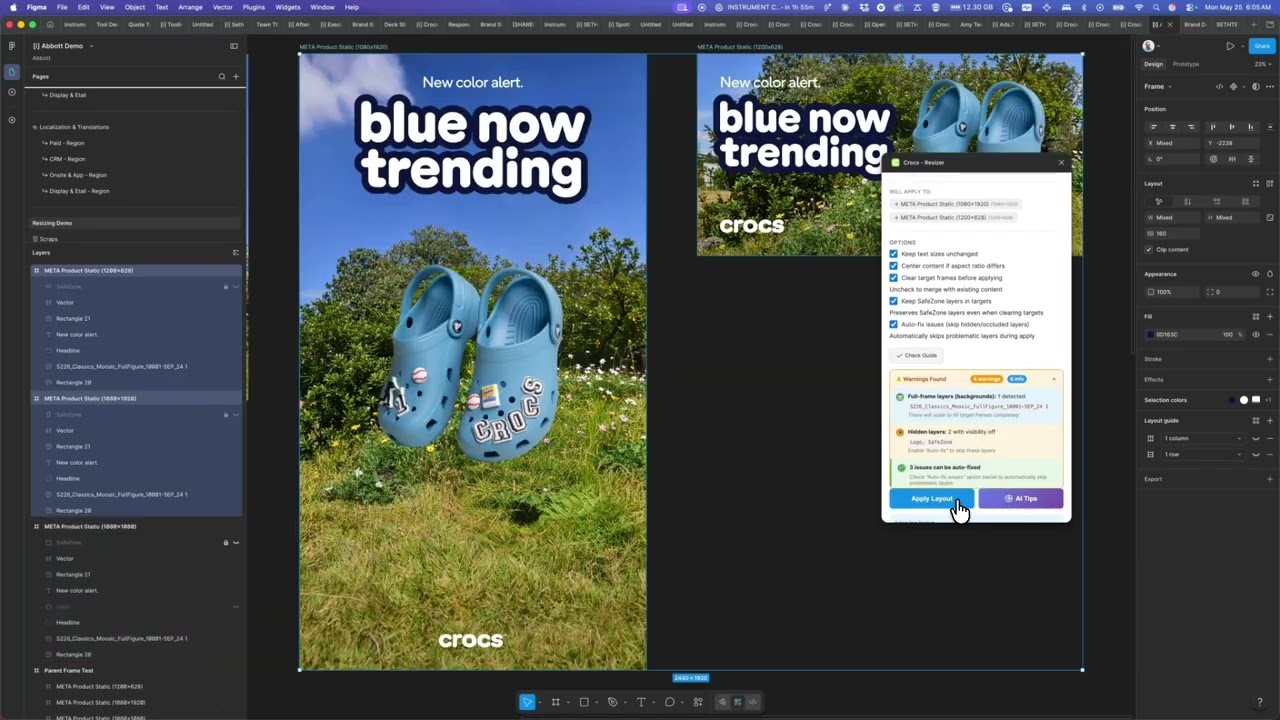
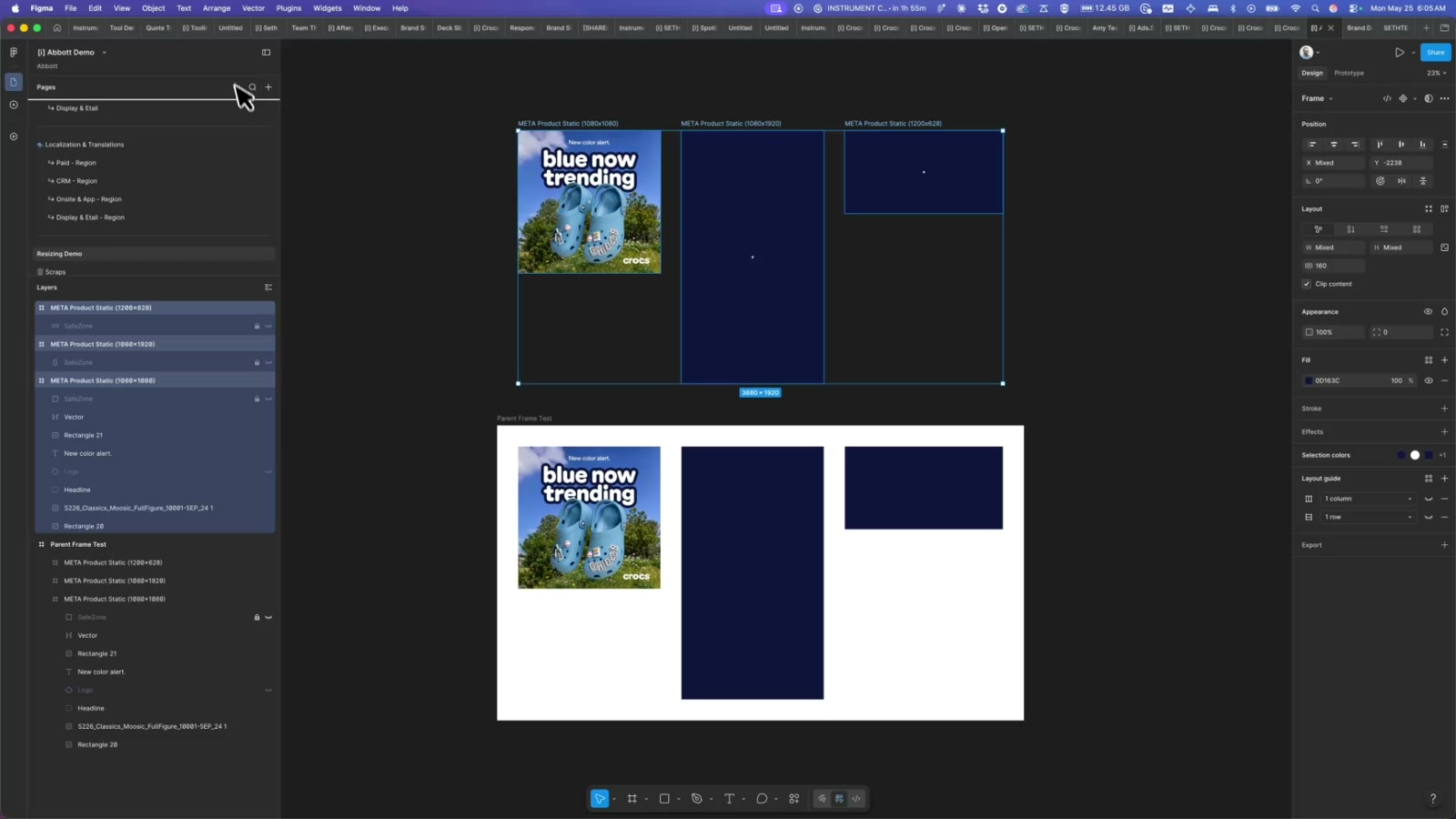
A custom Figma plugin that intelligently copies layout from a guide frame to multiple ad sizes — using a SafeZone system to anchor elements correctly across wildly different aspect ratios.
Ad production at scale has a dirty secret: resizing the same creative across 15+ formats is almost entirely manual. You move the logo, nudge the headline, pray the product shot still looks right. This plugin — built for a Crocs campaign — automates that entire pipeline inside Figma using a SafeZone-based layout system that understands intent, not just coordinates.
How the SafeZone system works
The core idea is a named rectangle layer called SafeZone that lives inside each frame. The guide frame’s SafeZone defines which elements should be constrained to the safe content area. Each target frame’s SafeZone defines where that content should land in its specific format — with appropriate margins for a 9:16 Story, a 1.91:1 banner, or a 300×600 display unit. Elements inside the guide’s SafeZone get anchor-aware repositioning: a bottom-right logo stays bottom-right, a centered product shot stays centered, a top-left badge stays top-left. Elements outside (backgrounds, bleed elements) scale to fill the full frame. When a constrained element is too large for the target’s SafeZone, it scales down uniformly rather than clipping or overflowing.
Wide format adaptation
The trickiest case is applying a square or portrait guide to a wide landscape target — a 1:1 social post becoming a 1.91:1 display banner, for example. V1.3 introduced a split-SafeZone layout that kicks in automatically when the guide aspect ratio is ≤ 1.1 and the target exceeds 1.5. Text elements move to the left half of the SafeZone, left-aligned; image elements anchor to the right half, centered. Text boxes switch to HEIGHT auto-resize so wrapped copy grows the container instead of clipping. It’s the closest thing to automated art direction I’ve built.
What this unlocks
The immediate win is time: what used to be an hour of manual resizing per creative becomes a single plugin operation. But the deeper implication is design system thinking applied to paid media. By encoding layout intent — not just pixel positions — into the Figma file structure, you can add a new ad size to a campaign without touching the guide. The plugin also ships with an AI tips feature via OpenRouter that can surface layout suggestions. The same SafeZone approach could extend to: email template systems where header modules adapt across mobile and desktop, localization workflows where RTL languages need mirrored layouts, or any design system where components need to live in containers of unpredictable proportions.
Applying this to your project
-
Copy the plugin folder, discard the scratch files. Take
code.ts,ui.html,manifest.json,package.json, andtsconfig.json. SkipPROJECT_CONTEXT.md(internal dev notes for this specific build) and don’t copycode.jsornode_modules— regenerate those yourself withnpm installthennpm run build. -
Set up your own API key, and don’t hardcode it like this version does. The only external service is OpenRouter, used for the “AI Tips” feature. Get a key at openrouter.ai. Because a Figma plugin’s JS bundle ships to anyone who inspects it, a key hardcoded in
code.ts(asOPENROUTER_API_KEY) is effectively public — route the request through your own small server/proxy instead, and only put your key there. -
Rebrand the obvious surface area. Update the
nameandidfields inmanifest.json, replace any Crocs-specific copy inui.html, and if your team uses different layer-naming conventions, update theSAFE_ZONE_LAYER_NAMESlist andSAFE_AREA_BOUND_ELEMENTSlist incode.tsto match. -
Know where your content actually plugs in. There’s no config file for content — the plugin works by scanning Figma layers for a rectangle named
SafeZoneinside a “guide” frame and inside each “target” frame (findSafeZoneLayer()). Everything else in the guide frame gets copied and repositioned relative to those two rectangles. In practice, this means your designers just need to name one rectangleSafeZoneper frame — no code changes needed to adapt it to new content. -
Watch for these non-obvious gotchas:
manifest.jsonsetsnetworkAccess.allowedDomainsto["none"], butanalyzeWithAI()incode.tsfetcheshttps://openrouter.aianyway — in a real published plugin this call would be blocked. You need to add the correct domain toallowedDomainsfor AI Tips to actually work.- The manifest uses
documentAccess: "dynamic-page", which requiresfigma.getNodeByIdAsync()instead of the older synchronousgetNodeById()— code copied from older plugin tutorials will silently break here. - Component instances are intentionally not supported as guide or target containers (
isContainerNode()only allowsFRAME,COMPONENT,COMPONENT_SET) because Figma blocks structural edits inside instances. - The “wide format split” layout (text left, images right) only kicks in when
guideAspect <= 1.1 && targetAspect > 1.5— formats outside that range fall back to plain anchor-based positioning, which can look wrong if you expected the split behavior.
Other ways to repurpose this
Product Design
- Build a tool that lets a designer create one master screen and automatically generate correctly proportioned versions for every device or screen size, instead of manually resizing each one by hand.
- Let a design team define “safe” content zones once, so important content is guaranteed never to get cropped or covered no matter what shape a screen turns out to be.
Web Design
- Offer clients a service where one approved homepage or hero design automatically reflows into every banner, header, and thumbnail size a site needs, cutting the manual resizing work on every project.
- Give clients a way to see exactly how their design will look across many device and screen sizes before anything is finalized, instead of asking them to imagine it.
Marketing
- Turn one approved campaign visual into a complete, consistent set of ad sizes for every platform automatically, so nothing has to be redesigned by hand for each channel.
- Add a built-in advisor that suggests how to adjust a layout for a new format, so less design expertise is required to keep every version of a campaign on-brand.
Branding
- Guarantee that a logo or key visual never gets cropped or hidden, no matter what size or shape a design is adapted to.
- Let a brand’s guidelines dictate exactly how a logo should sit in a layout — tucked in a corner, centered, or aligned to an edge — so every resized version automatically stays visually consistent with the brand.
Dependencies
- Role
- Design Engineer
- Tools
- Figma Plugin API TypeScript OpenRouter API