Automated HubSpot Pipeline Reports
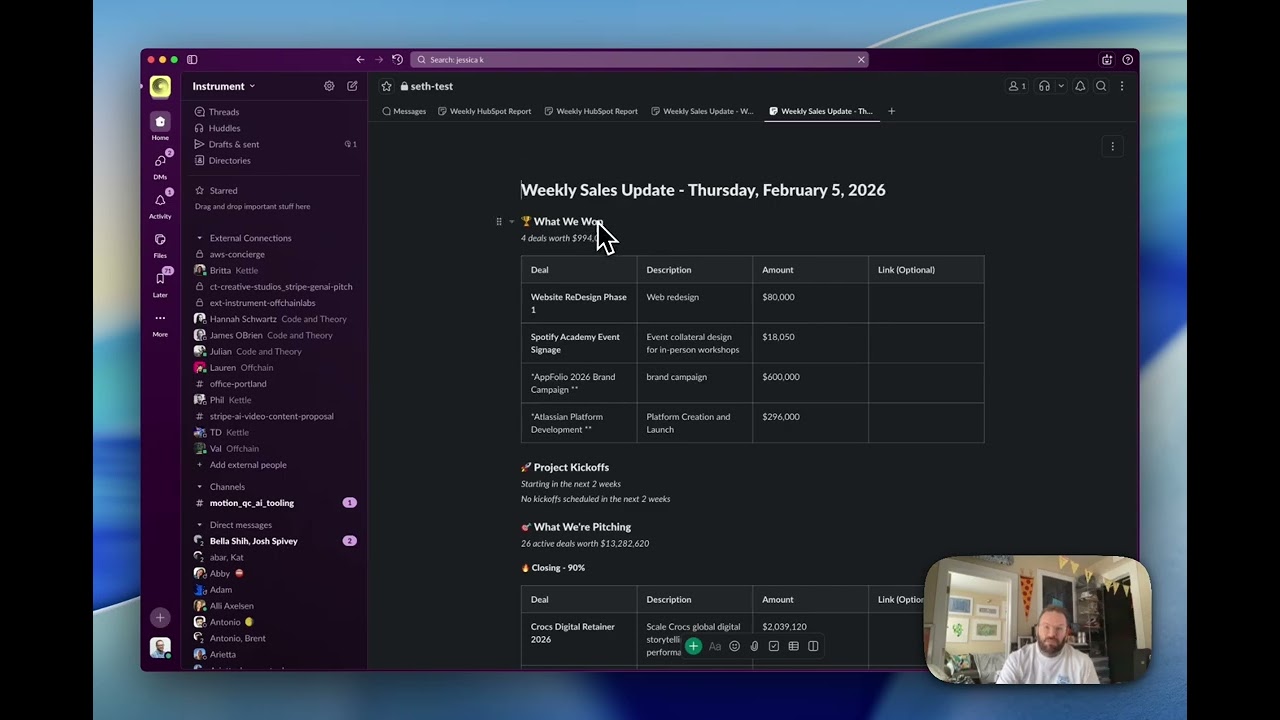
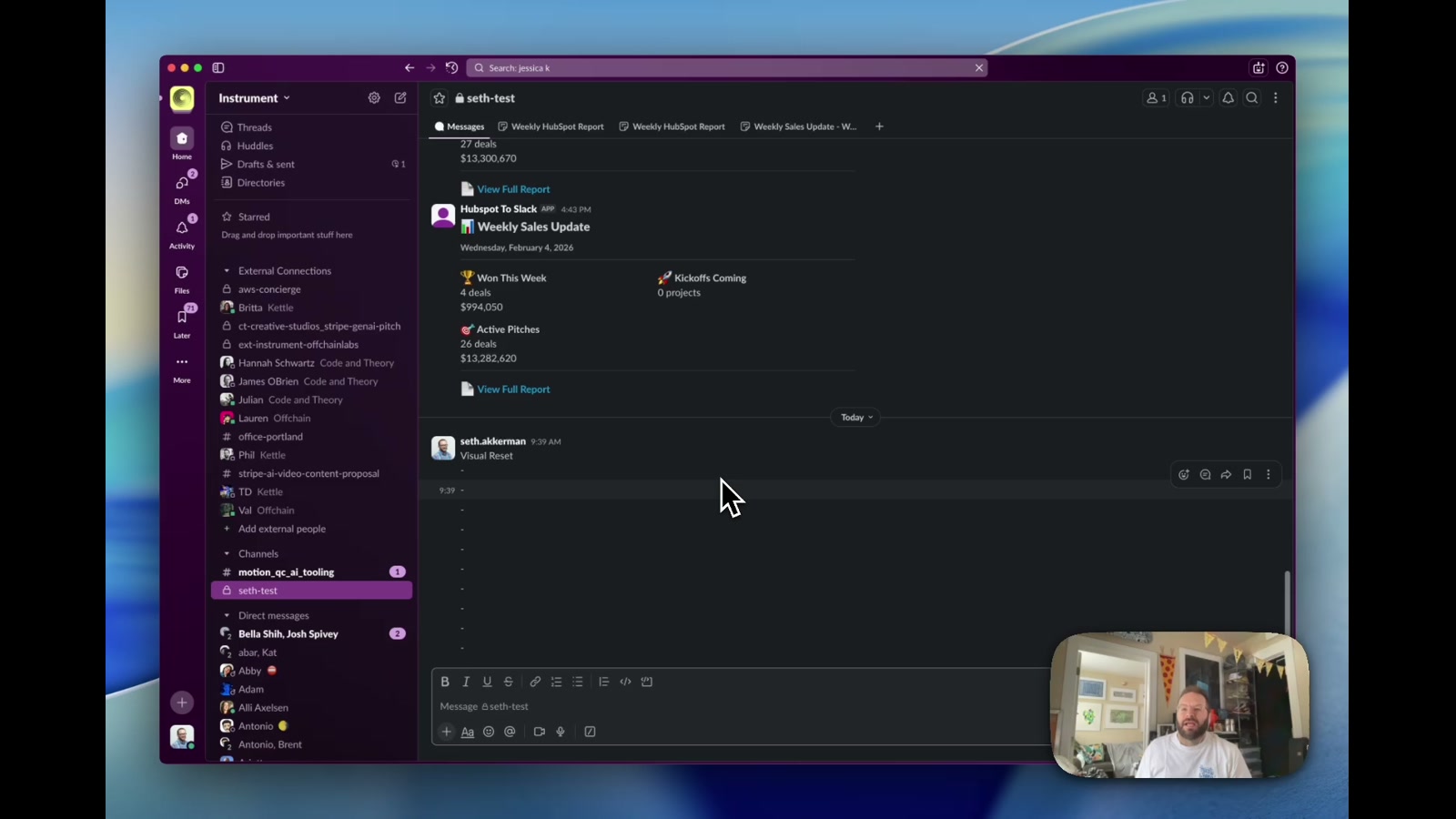
A GitHub Actions-powered automation that pulls live deal data from HubSpot every weekday and generates a formatted Slack canvas — surfacing wins, active pitches, and kickoffs without anyone having to manually post a thing.
Sales pipeline visibility is one of those things that’s genuinely valuable to a team but consistently falls through the cracks — because it depends on someone remembering to post an update every week. This tool removes that dependency entirely. It’s a scheduled automation that pulls live deal data from HubSpot and generates a formatted Slack canvas every weekday at 10am, complete with wins, active pitches broken out by close probability, and upcoming project kickoffs.
How it works
A GitHub Actions workflow fires on a cron schedule (Monday–Friday, 10am PST) and kicks off a Node.js script that does two things: first, it queries the HubSpot CRM API for deals filtered by team, stage, and date window — mapping owner IDs to real names via the Owners API. Second, it calls the Slack Canvas API to either create or update a canvas in the target channel, then posts a summary message with key stats and a direct link to the full report. The canvas is structured markdown: a won-deals table, active pitches grouped by pipeline stage (Closing 90%, High Likelihood 65%, Moderate 30%, Qualified Lead 15%), and an optional kickoffs section.
The build
The system was built to support multiple studio teams at Instrument — Brand Studio and Product Studio each have their own canvas, channel, and team filter. Switching teams is a one-line config change. The canvas update flow uses canvases.edit with a replace operation so the canvas URL never changes and channel history stays clean. Owner fetching uses a direct fetch() call rather than the HubSpot SDK, which had reliability issues on that particular endpoint. Environment variables are managed via GitHub Secrets in CI and a local .env for development — no infrastructure required beyond a GitHub repo.
Why it matters
The real value here isn’t the technology — it’s the cognitive load it removes. Before this, someone on the team was manually compiling and posting pipeline updates every week. That’s a task that’s easy to skip, easy to do inconsistently, and easy to resent. Automating it means the team gets reliable, timely visibility into what’s winning and what’s in flight, and the person who was doing it gets that time back. The same pattern applies broadly: any CRM-to-communication-channel sync — agency new business, product sales, recruiting pipelines — can be automated this way with minimal infrastructure and zero ongoing maintenance cost.
Applying this to your project
- Copy the whole
hubspot-slack-canvas/folder and dropnode_modules,.env(it holds real tokens — never commit it), and.gitif you’re starting a fresh repo. Keepsrc/,scripts/,.github/workflows/,template.yaml,package.json, andpackage-lock.json. - Create a HubSpot Private App (scope
crm.objects.deals.read) and a Slack App with Bot Token Scopescanvases:write,canvases:read,chat:write,channels:read. Put the resulting values in a local.env(copy.env.examplefirst) asHUBSPOT_ACCESS_TOKEN,SLACK_BOT_TOKEN,SLACK_CHANNEL_ID, andTEAM_NAME. For automated runs, add the same values as GitHub Actions repo secrets (Settings → Secrets and variables → Actions) — the workflow at.github/workflows/weekly-report.ymlreads them by exact name. - Swap out the hardcoded business logic in
src/hubspot.js: theSTAGESobject maps this org’s actual HubSpot pipeline-stage IDs to labels, and theinstrument_teamproperty name is this company’s custom field for team filtering — replace it with whatever custom property (or drop the filter) matches your own HubSpot portal. Also update thestageOrderarray and emoji labels insrc/slack.jsto match your renamed stages. - The integration point for new data is
formatDeal()insrc/hubspot.js(add fields toDEAL_PROPERTIESand the returned object) and the corresponding markdown table columns informatCanvasMarkdown()insrc/slack.js— that’s where a designer would add or remove columns shown in the Slack Canvas. - Gotcha: the “Project Kickoffs” section is fully built but intentionally commented out in both
src/hubspot.js(fetchKickoffs) andsrc/slack.js(the markdown block and summary stat) — search for “KICKOFFS TEMPORARILY DISABLED” to re-enable it. Also notescripts/run-ci.jsexpects env vars to already be injected by CI (no dotenv), whilescripts/test-local.jsis the one that reads.env— don’t confuse the two when testing locally.
Other ways to repurpose this
Product Design
- Automatically turn scattered backlog or roadmap data into a single always-current status page that stakeholders can check without asking for an update.
- Build a lightweight way to preview what a generated report or document will look like before it gets sent out to a client.
Web Design
- Use the same “pull data on a schedule, format it, publish it automatically” pattern to keep a public stats or case-study page fresh without manual edits.
- Turn a client’s CRM or booking data into an auto-updating public-facing summary, like a “recently completed projects” feed on a website.
Marketing
- Send a recurring, nicely formatted digest of campaign wins or pipeline activity straight into the team’s chat tool instead of a manual weekly email.
- Automatically group and highlight the biggest or most urgent opportunities so the team’s attention goes to what matters most each week.
Branding
- Generate on-brand, consistently formatted status reports so every team’s weekly update looks and reads the same way, reinforcing a shared visual voice.
- Use scheduled, automatic delivery of branded recaps as a subtle way to keep a client engaged and reminded of ongoing value between formal check-ins.
Dependencies
- Role
- Design Engineer
- Tools
- Node.js GitHub Actions HubSpot API Slack API Slack Canvas API