AI Speech Outline Generator
A Google Docs add-on that generates structured speech outlines directly inside a document — audience, topic, duration, tone, and brand inputs feed an OpenAI model that inserts a formatted table ready to present from.
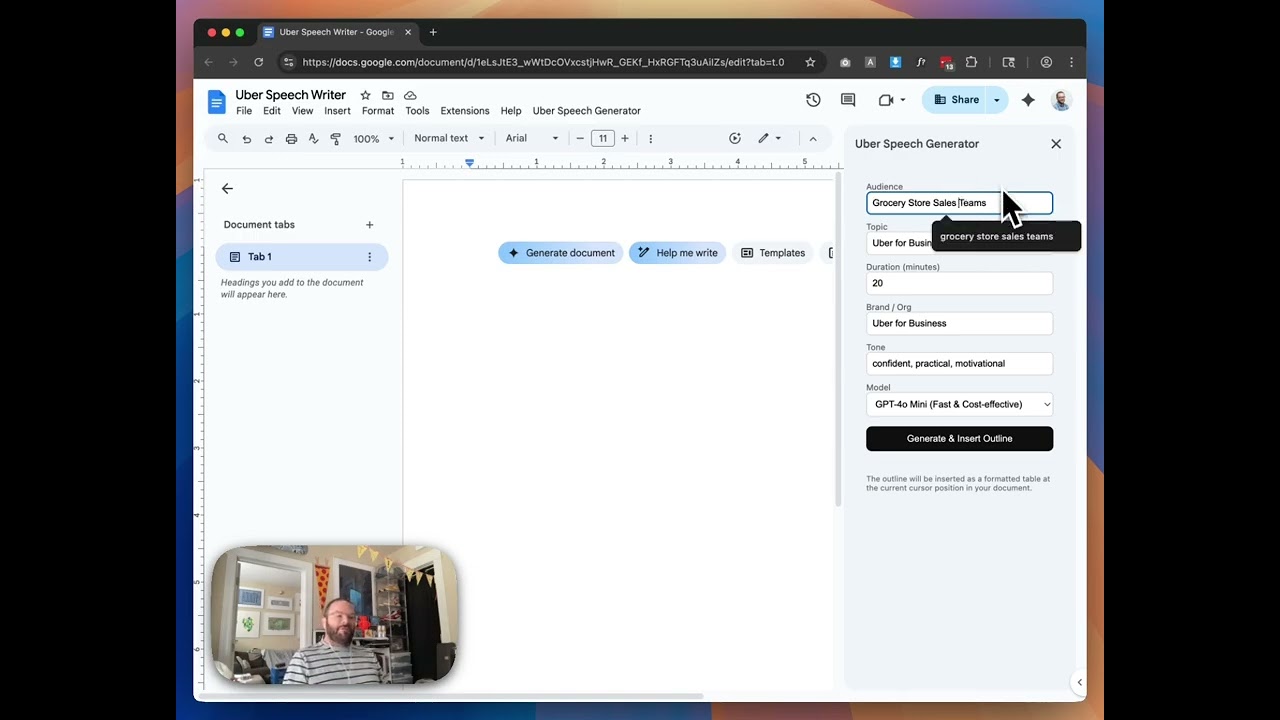
Built as a client-facing demo for Uber for Business, this tool lives entirely inside Google Docs — no separate app, no copy-pasting between tabs. A custom sidebar panel surfaces a handful of fields: audience, topic, duration, brand, and tone. Hit generate, and a fully structured speech outline gets inserted at the cursor as a formatted table, complete with section breakdowns, durations, and talking points.
How it works
The sidebar is a lightweight Google Apps Script web app wired directly into the document. When a user submits the form, it calls a server-side function that constructs a prompt and hits the OpenAI API — defaulting to GPT-4o Mini for speed and cost-efficiency, with GPT-4o and GPT-4 Turbo as selectable options. The response is parsed and written back into the document as a native table, so it looks like something you actually built in Docs rather than something pasted in from a chatbot.
The default configuration is pre-filled for Uber for Business use cases — “Grocery Store Sales Teams” as the audience, 20-minute duration, confident and motivational tone — but every field is editable. The whole thing can be locked down or opened up depending on how much control you want to hand the end user.
Why it matters
Most AI writing tools ask you to leave your document, generate somewhere else, and paste back in. This collapses that workflow entirely. The document is the interface. For sales teams preparing customer-facing presentations, that friction reduction is the whole point — the fewer context switches between tools, the more likely people actually use it.
The broader pattern here is interesting: Google Workspace as an AI deployment surface. Docs, Sheets, and Slides all support Apps Script, which means tools like this can be deployed to an entire org without anyone installing anything. Enterprise rollouts that would normally require IT approval and a new SaaS subscription can sometimes just be a script attached to a shared file.
Applying this to your project
- Copy both files as-is:
code.gsandSidebar.html. There’s no build step, no other config, and nothing to discard — this is the entire project. - Before anything else, deal with the API key:
code.gsline 9 hardcodesDEMO_API_KEYin plaintext. Delete that value, and instead wire the sidebar to thesaveApiKey()function that already exists in the code but currently has no UI calling it — add a small “Save API Key” input/button inSidebar.htmlthat callsgoogle.script.run.saveApiKey(key), so each user’s key lives in that document’s Script Properties instead of in your source file. - Swap out the hardcoded brand defaults for your own client: the fallback values in
sanitizeForm()('Uber for Business','Grocery Store Sales Teams', the tone string) and the matching placeholder/value attributes on the inputs inSidebar.html. Also rename the menu label inonOpen()and the sidebar title inshowSidebar()away from “Uber Speech Generator.” - The two real integration points are
buildMessages()andinsertOutlineTable()incode.gs.buildMessages()defines the JSON schema the AI must return (total_minutes,sections,bullets) — change this if you want a different kind of document (e.g. an agenda instead of a speech).insertOutlineTable()is what turns that JSON back into a formatted Doc table — any schema change on one side needs a matching change on the other. - Gotchas found in the code:
response_format: { type: "json_object" }incallAiForOutline()only works with newer OpenAI models — if you add older models to the dropdown inSidebar.html, the request will fail. There’s also no retry/timeout handling around theUrlFetchApp.fetch()call, so a slow or rate-limited API response just surfaces as a raw error string in the sidebar. Andconsole.log(JSON.stringify(json...))ingenerateSpeechOutline()is a leftover debug line worth removing once you’re past testing.
Other ways to repurpose this
Product Design
- Let someone answer a few plain questions and instantly get a fully structured document instead of starting from a blank page.
- Turn any repetitive writing task — briefs, agendas, project plans — into a one-click tool that lives inside the software people already use every day.
Web Design
- Build a short form on a site that turns a visitor’s answers into a personalized document they can generate and download on the spot.
- Show a friendly “working on it” moment while content is generated, so waiting feels like progress rather than a stall.
Marketing
- Turn this into a lightweight lead-generation tool: prospects answer a few questions and get a custom outline back, which signals expertise before a sales call even happens.
- Offer clients an ongoing branded tool that drafts talks, emails, or scripts in their voice, creating a reason to stay engaged well after the main project wraps.
Branding
- Use the same approach to produce on-brand copy variations — taglines, bios, event descriptions — that automatically follow a client’s tone and style.
- Bake a client’s voice and formatting rules into the generator itself, so every output stays consistent no matter who on their team requests it.
Dependencies
- Role
- Design Engineer
- Tools
- Google Apps Script OpenAI API GPT-4o Google Docs